
Guess the Object: Free UGC Video Generator, No Signup Required
Show someone a spring wedged between two strips of wood. What would they guess? The detail could belong to a toy or a tool. A few seconds later, show the entire object. The ordinary thing they recognise is the punch line.
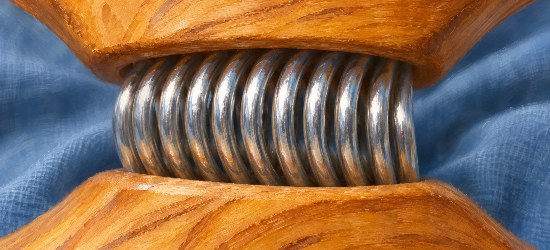
You can make this game with one phone photo and any everyday object with a detail worth looking at. Start with the cropped clue below. Think of one answer before you look at the wide view.

The clue shows a single detail. Give your viewer a moment to guess before scrolling.
Make both views from one photo
Choose a household object with two different levels of detail. From across the table it should have a clear outline. Up close it should have a texture, joint or mark that looks unfamiliar on its own. A wooden clothespin works because its spring is easy to recognise as metal, while the cropped coil gives away little about the shape of the wooden jaws.
Lay the object on a plain surface in soft light. Photograph it with room around all sides. For a square game, crop the overall shot to a square first, checking that the whole object still fits. Save that image as your wide view. Duplicate it, then crop the duplicate to a smaller square around the detail. Leave enough wood around the spring to give the viewer something to work with, and keep the ends of the clothespin out of the clue.

The answer is a wooden clothespin. The preceding square clue is cropped from this same original illustration.
The two square examples here come from one original AI-generated illustration. The clue is a direct crop of the wide view. For your own game, using one actual photo keeps the texture, angle and lighting tied to the same object. Take the wide photo in good light so the crop still has enough detail when it fills the screen.
Try the clue on a small screen. If someone can already see both jaws, crop a little tighter. If it looks like a blur of gray lines, back out until the viewer can see the coil against the wood. Keep the original wide image handy while making these changes.
Try one pullback
A short pullback can bridge the two views. It should look like the camera moves away from a stationary object. This complete prompt is written for the clothespin pair.
Start with the tight view of the silver coil between the two pieces of golden wood. Pull back slowly in a single steady motion from the Start Frame to the wider End Frame, keeping the spring near the centre. Reveal the complete wooden clothespin lying diagonally on the blue fabric. Preserve the same coil, wood grain, cloth, viewing angle and light. Keep the clothespin still and preserve the spacing between its two wooden halves. Keep one object in view and leave out hands, text, new objects and camera rotation.
For a different object, replace the spring, wood and fabric with details that are actually visible in your pair. Prompts can describe how the view should widen. The original photo is still the clearest source for the final answer.
UGC Maker AI is one option for animating the clue and reveal frames. Its generator page describes a free browser tool with no signup required, powered by MiniMax H3. The UGC Maker AI MiniMax H3 page also uses the term unlimited. This example supplies stills and a prompt for trying the workflow. It includes no generated video test.
- Load the tight clue into Start Frame.
- Load the wide original into End Frame. This image-guided workflow uses both frames.
- Choose 1:1 for the square pair shown here. If you make a portrait or landscape pair, match the layout to both inputs.
- Paste the prompt and select Generate.
- Preview the result when it is available. Check whether the spring stays in the same place on the clothespin and whether the full shape remains recognisable. Download a take if you want to use it as the transition.
Give people time to guess
In your video editor, place the cropped still first. Hold it for about three seconds as a starting point, then watch the opening once at normal speed. Adjust the hold if you need longer to read the question or make a guess. Type “What is this?” over the clue with enough contrast to read it.

A pause between the clue and the reveal gives someone a chance to make a guess. This illustration shows the idea with paper prints.
Next, place the generated pullback if it matches your object. Finish on the actual wide photo and add “A wooden clothespin.” Let that last image sit long enough to read the answer. Add both lines as editable text in your video editor so you can position them away from the spring and jaws. Check how the clip reads with the sound muted, and listen for any generated audio before deciding what to keep.
If the spring shifts, a third wooden arm appears or the generated shot changes the object, skip the transition. Put the cropped still and the real wide photo next to each other in the editor. Keep the same question, pause and answer, and use a straight cut between the two pictures. Export the short clip in the ratio you chose, play it once on your phone, then share it with someone who has yet to see the answer.
Comments
0