
Let a Drawing Fill with Color: A Free Image-to-Video Generator, No Signup Required
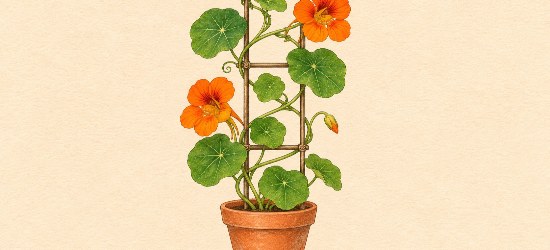
An ink drawing already contains a small promise: those empty petals could become orange, those round leaves could become green. For an artwork introduction, that change can be the whole event. The plant does not need to grow, a brush does not need to enter, and the camera does not need to circle the pot.
Here is a concrete exercise for a free image-to-video generator with no signup required: prepare an uncolored drawing and its finished color version, then ask for a five-second reveal between them. The example is a nasturtium on a trellis, with orange flowers, green leaves and a terracotta pot. It is an AI visual interpretation of an artwork, not a time-lapse proving how someone painted it.
This AI-assisted guide uses prepared illustration examples. No example video has been generated with VO4 AI, and the motion prompts have not been tested here.

A concept for the two endpoints: an uncolored drawing and a colored version. The independently illustrated panels are not pixel-identical export files; build your real pair from one layered document.
Make two exports from one drawing
Start with artwork you created or have permission to use. Choose a subject with a few readable color areas rather than tiny lettering or intricate ornament. A flower, a small illustrated building or a piece of fruit can give the color somewhere clear to arrive.
The useful preparation happens in your image editor. Keep the outline on its own layer, the color beneath it and the paper background beneath both. Lock the outline and background so adding color does not move them. Give the artwork enough margin to keep its outermost shapes inside the final frame.
- Set the canvas to one aspect ratio. For this example, use a landscape 16:9 canvas.
- Hide the color layer and export the uncolored version as the first image. Leave the outlines and paper visible.
- Show the color layer and export the finished version as the last image. Keep exactly the same canvas dimensions, crop and artwork position.
- Reopen both exports. Alternate between them at the same display size. The pot rim, trellis and flower centers should stay in place; the intended difference is color.
If the outline jumps when you alternate the files, fix the source document before writing a longer prompt. Two independently redrawn plants may look similar but contain different leaves, pot widths or stem paths. Asking a model to connect those differences adds a second problem to the reveal.
The side-by-side illustration above explains the idea; its two panels were illustrated together and are not exact matching exports. Do not upload that entire comparison board as a single endpoint. Prepare two separate, clean files from your own layered artwork, without a border, caption, arrow or palette beside the drawing. JPEG, PNG and WebP are listed on the VO4 free form.
Choose how the color should arrive
For the nasturtium exercise, choose a gradual color appearance across the already drawn shapes. Keep the paper ivory, the ink lines visible and the viewpoint still. The sequence is deliberately modest: an opening moment with little color, a smooth build and a settled finished image.
There is no need to add a moving brush merely to explain the change. A brush introduces another object, a path and an implied physical painting process. If your intended post is an artwork reveal, the color itself supplies the action.

Plan the palette before the motion: orange petals, green leaves and a terracotta pot. This studio illustration shows preparation, not a recorded painting session.
Before generating, decide the palette in the ending image. Do not leave the endpoint green while asking the prompt to finish with blue leaves. In this exercise, the final image carries the detailed appearance; the prompt describes the intended progression between the inputs.
Copy a complete color-reveal prompt
Use the following prompt with two separate, aligned endpoint images. It requests a treatment; it is not a guarantee of timing, line preservation or an exact match to the final frame.
Five-second artwork reveal, fixed frontal view. Begin with the supplied uncolored ink drawing of a potted nasturtium on ivory paper and progress toward the supplied colored ending image. Let orange gradually appear inside the existing flower petals, green inside the existing leaves and terracotta inside the existing pot. Keep the ink outlines visible and request the same composition throughout. Let the color build smoothly, then settle into the finished palette near the end. Keep the paper background quiet. No moving brush or hand, no new flowers or leaves, no plant growth, no camera move, no lettering and no added objects.
To adapt it, replace the subject, its color areas and the palette together. For a pear illustration, for instance, the corresponding phrase could be “yellow-green inside the existing pear, muted green inside the existing leaf and brown along the existing stem.” Prepare an ending image that actually shows those choices.
Keep the camera and subject instructions consistent. “Fixed frontal view” and “dramatic orbit” describe different shots; adding both does not make the request more precise. If the finished artwork needs a caption or signature, add that later in your publishing layout or an external editor instead of making generated lettering part of this first attempt.
Try the pair in the free form
The VO4 AI free image-to-video generator is one option for this short concept attempt. Its official page describes five seconds at 480p and zero credits. The free workflow does not require an account, but submitting a request requires verification. These are the page’s stated conditions, not results measured for this tutorial.
Open the image-guided route, provide the uncolored first image and colored last image in that order, and paste the motion prompt. Choose the ratio that matches the exports—16:9 for the example—then complete verification and submit. Free attempts may queue; an unlimited-generation description does not establish immediate processing or a fixed wait.
The official page describes previewing a take and saving it through the download dialog. Its task history is local to the page and browser, so save any useful clip rather than treating that history as a project archive.
Watch the drawing, then the color

An imagined finish-detail study, not a video frame. Use comparable details in your own drawing to judge whether a future candidate keeps the artwork recognizable.
If you produce a candidate, watch it once at ordinary size. Does it read as the same artwork acquiring color, or as one drawing changing into another? Then pause near the opening, middle and end. Follow the pot rim, one trellis joint and the center of a flower. They give you concrete places to notice a new edge, a wandering outline or an extra shape.
Check the pacing separately. A sudden color flash may not fit a quiet reveal, while a transition that never reaches a recognizable finished palette may hide the work you meant to introduce. You can revise the description of the color build for another attempt, but prompt wording cannot guarantee exact timing or preserve every contour.
If a candidate invents a leaf or changes the drawing substantially, compare the two source exports first. If those are aligned and the change remains unwanted, simplify the subject or keep the original stills. For a reveal where the exact artwork must remain unchanged, an external editor can dissolve between the two still images; that is a separate editing method, not a VO4 recolor control.
When you share a generated interpretation, describe it as an AI-assisted color-reveal concept. Use an actual process recording if the purpose is to show how the artwork was made. For this exercise, the satisfying outcome is smaller: a readable introduction in which the color gets a turn to arrive.
Comments
0